 The Column





I haven’t used Google Chrome much the past 5 or 6 years. I opened it this morning and trolled through my bookmarks.1 It was like time traveling, and gave me some perspective. That’s this post.
Tldr
I still do the same things I used these tools for… and they’ve all changed out from under me.
Revisiting Old Tools
- Springpad - note taker
- This tool died and its URL is now just something entirely different
- Evernote - note taker
- Is chock full of AI & “do things our way”
- Roam Research - note taker
- Roam was ahead of its time
- Dropbox - file sync
- Found some old photos I didn’t have from my dad’s retirement party. Nice.
- This would still work fine, I just use iCloud & Google Drive already.
- Wunderlist - task management
- Bought then killed. Thanks capitalism.
- Google Fit - fitness tracker
- So glad I left this ecosystem. Health is a long-term concern. An ever-changing support system for tracking and trending health is not helpful.
- Mint - finance app
- Bought then killed. Thanks capitalism.
- Notion - digital multitool
- I surprised myself realizing that Notion was relegated to “old tools”.
Commoditization of Tooling
I do tech for a living. People who genuinely need more tech than I do should be rare.
Yet the tools I need to do the things I do are really not that many.
| Use case | Primary Tool | Secondary Tool |
|---|---|---|
| Writing | Obsidian | VS Code |
| Data Analysis | Any spreadsheet | VS Code |
| Coding | VS Code | Claude |
| Safari | Apple’s Mail app | |
| CAD Modeling | Fusion 360 | Bambu Studio |
| 3D Printing | Bambu Studio | Fusion 360 |
| Video Editing | Final Cut Pro | Procreate |
| Photo Editing | Mac’s Preview app | Procreate |
| Doodles | Excalidraw | Procreate |
| Animations | ToonSquid | Procreate |
| Automations | Siri Shortcuts | Google Apps Script |
| Gaming | Switch 2 | Mac Mini |
The things I want to do with these tools haven’t changed. Why do the tools need to change?
Generative AI is neat. Let that be a service I take things to rather than baking them into everything.
Files over Tools
Another way of saying what I’m trying to say here:
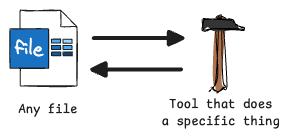
This is how things have worked for years. I don’t need a whole ecosystem of new and exciting concepts that change over time without my control.
Top 5: Productivity Techniques that Work for Me
To balance out the previous Top 5.
5. My Obsidian-based Project Management System
See this note all about it it.
4. Pre-block Task List
A practice I’m doing as I write this. At the very beginning of a timeblocked work session spending 2 minutes to physically write down the tasks I plan to accomplish during the block.
3. Annual Goals + My Data Journal
See a litany of Columns on this system. Column 481, for example.
2. Weekly Review
The cornerstone of productivity. I’m guilty of skipping these some weeks lately, but every time I succeed I am reminded how critical they are.
1. Daily Post-it Note
Start each day by reviewing where and when I need to be, and what my 3 priorities are for the day.
Quote:
Either that or Jeff Bezos bought Hell and evicted everyone and now they live here. - Nick Mason
Footnotes
-
clearly I had a productive morning. :-| ↩